Devices might experience a black screen or desktop loading issues after sign-in
Microsoft has received reports of this issue occurring in some virtual desktop environments.
載っている取得元(4 件。未解決 0 件)
| 取得元 | 状態 | きっかけ | 載せた日 | 解決日 | 更新日 |
|---|---|---|---|---|---|
| Windows 11, version 24H2 | 解決 | OS Build 26100.9278 KB5120998 2026-08-27 | 2026-10-13 | 2026-10-13 | 2026-10-13 |
| Windows 11, version 25H2 | 解決 | OS Build 26200.9278 KB5120998 2026-08-27 | 2026-10-13 | 2026-10-13 | 2026-10-13 |
| Windows 11, version 26H1 | 解決 | OS Build 28000.2804 KB5120996 2026-08-27 | 2026-10-13 | 2026-10-13 | 2026-10-13 |
| Windows 11, version 26H2 | 解決 | — | 2026-10-13 | 2026-10-13 | 2026-10-13 |
経過
| 見つけた日 | 出来事 | 取得元 |
|---|---|---|
| 2026-10-14 | 解決 解決日 2026-10-13 | Windows 11, version 25H2 / 26H1 / 26H2 / 24H2 |
| 2026-10-14 | 内容更新 更新日 2026-10-13 | Windows 11, version 25H2 / 26H1 / 26H2 / 24H2 |
| 収録時 | 回避策あり 配布元の更新日 2026-09-29 | Windows 11, version 24H2 / 25H2 / 26H1 / 26H2 |
関連記事
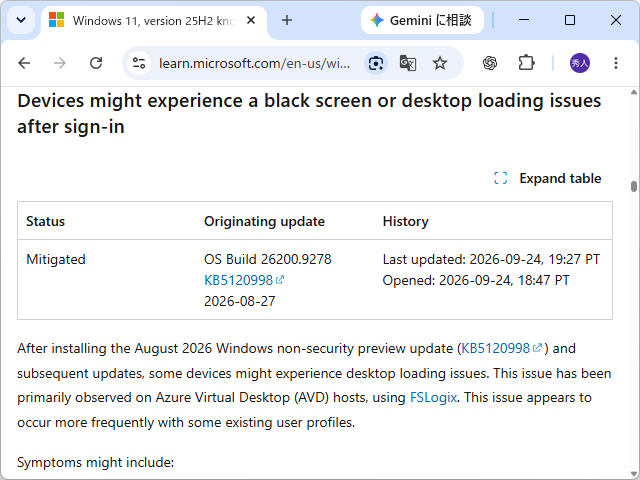 一部のWindows 11環境でサインイン後に画面が真っ黒に ~8月のプレビューパッチが原因/Microsoftが回避策を案内、今後の更新プログラムで解決へ米Microsoftは9月24日(現地時間)、OSへのサインイン後に画面が真っ黒になり、デスクトップが読み込まれない不具合がWindows 11環境で発生していることを明らかにした。2026年8月27日に公開されたプレビュー更新プログラムおよびそれ以降を適用した以下のプラットフォームで発生しているという。
詳細
- Resolution
- KB5127648
- Affected platforms
- Client: Windows 11, version 26H2; Windows 11, version 26H1; Windows 11, version 25H2; Windows 11, version 24H2 Server: None Back to top Remote Desktop connections might fail for non-admin users with error 0xC000000D Status Originating update History Mitigated OS Build 26100.9550 KB5124010 2026-09-22 Last updated: 2026-10-13, 10:13 PT Opened: 2026-10-13, 09:43 PT After installing the September 2026 non-security preview update ( KB5124010 ), or later updates, non-admin users might be unable to establish Remote Desktop connections to remote devices that have Administrator protection enabled. Attempts to connect might fail with error 0xC000000D and display the message, “The token that was passed to the function is invalid.” This issue primarily affects enterprise-managed remote devices used as Remote Desktop hosts with Administrator protection enabled, regardless of how the feature was enabled . Note : If your organization uses Windows security baselines , published through the Microsoft Security Compliance Toolkit, Administrator protection is enabled by default in Windows 11, version 24H2, 25H2, and 26H2 security baselines, unless your organization has configured the policy differently. Workaround: IT administrators can mitigate this issue on devices affected by the Remote Desktop connection failure by using their existing policy management method to temporarily turn off Administrator protection. Reset the User Account Control Type Of Admin Approval Mode policy in Microsoft Intu…
こちらで見つけた日
まだ来ていない日付